
All BarnTalk sensors have the unique ability to be personalized to your farm's needs. This includes naming individual sensors.
Renaming your BarnTalk Gateway and Sensors: (Video ~ 1 minute)
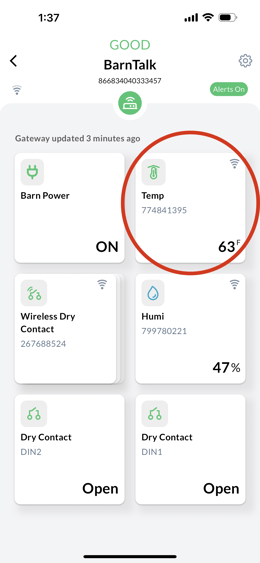
Step 1: To name your sensors, open the BarnTalk app and choose the gateway you want to customize.
Step 2: Click on the individual sensor tile to open that sensors information.
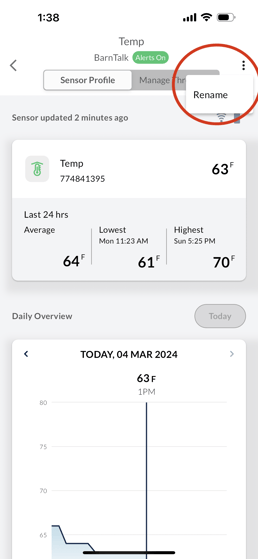
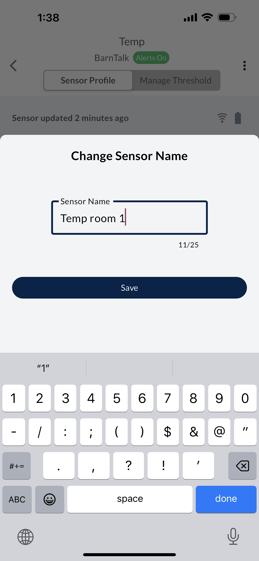
Step 3: At the top, you will see the current name of the sensor. Click on the three dots (top right) by the name and a screen will pop up that prompts you to customize the sensor's name.
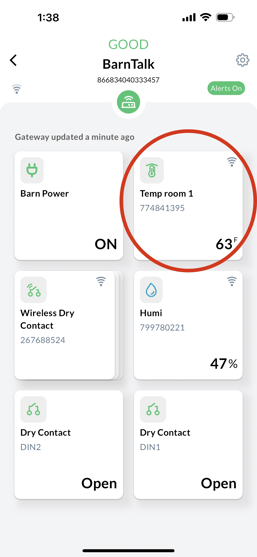
Step 4: Click save and then you're done with that sensor! Repeat the same steps for the rest of your sensors as needed.
If you have any issues or feedback, reach out to our support team via email at support@barntools.com, call/text 515-272-5122, or call Toll Free at 855-580-0058 during the hours of 8am-5pm CST Monday-Friday.