
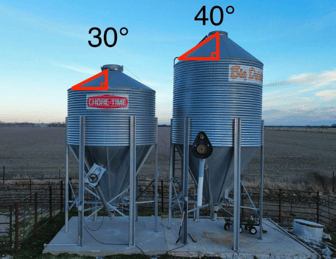
When installing a BinTalk sensor, entering the correct roof angle and bottom cone angle helps the feed sensor more accurately calculate feed levels in your bin.
You can now add these angles during installation in the app or update them later in the sensor settings. If you’re unsure what your angles are, this guide will help you identify and measure them.
When You Should Enter or Update Angles
You may want to enter or update your bin angles when:
- Installing a new BinTalk sensor
- Replacing a sensor on an existing bin
- Updating bin information inside the BarnTalk app
These values can always be edited later if needed.
Where to Enter Angles in the App
- Open the BarnTalk mobile app, and select your Gateway tile.
- Tap on the BinTalk Pro sensor tile in the list. In the upper right-hand corner, tap on the 3 dots and press Bin settings to edit your settings.
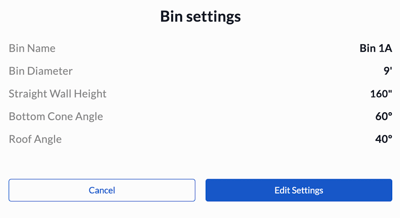
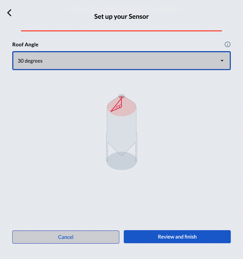
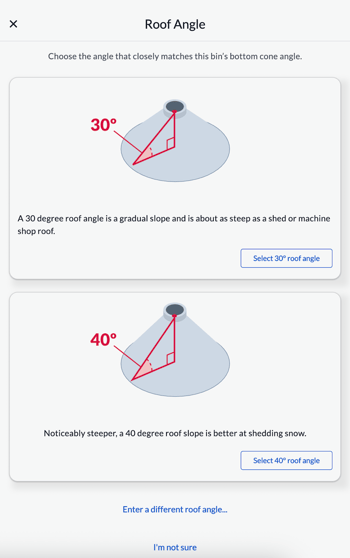
- Fill out or continue through your Bin dimensions until you reach the Bottom Cone Angle and Roof Angle pages. You can then choose from the dropdown menu a selection of common angles, or enter in your own value.
-
Bottom Cone Angle Settings
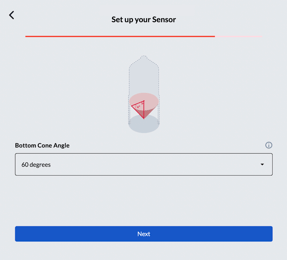
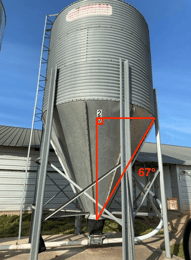
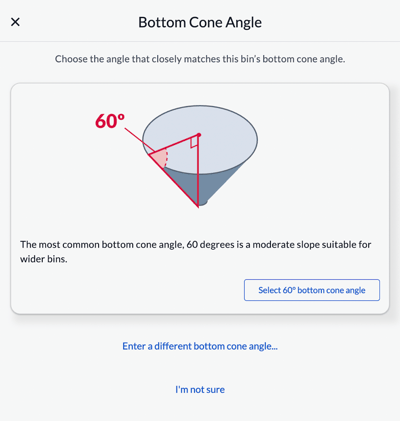
-
Roof Cone Angle Settings
-
- To finish up, tap on Review and finish to save your settings.
Note: Once you save your Bin settings, give the BinTalk sensor up to 2 hours to calibrate.
How to measure your Bin's Roof and Cone angles
-
iPhone - Measure App
- Use the built-in Measure app on iPhone.
- Open the app, and select “Level”
- Use the built-in Measure app on iPhone.
-
Android - Clinometer + bubble level App
- Download the Clinometer + bubble level app in the Google Play Store on Android.
-
Protractor or Other Manual Tools
Common Bin Manufacturers with Angles
If you have any issues or feedback, reach out to our support team via email at support@barntools.com, call/text Toll Free at 855-580-0058 during the hours of 8am-5pm CST Monday-Friday.