
Scan-to-Pair
Gateway owners / secondary gateway owners can add sensors from the app. CallTree members do not have this access.
Step 1: Make sure the Gateway is turned on and the antennas are attached.
Step 2: Open the BarnTalk app and click on the Gateway tile you would like to pair your sensor(s) to.
Step 3: In the upper right-hand corner, you will see a gear icon. Click on the gear icon and a screen will pop up that prompts you to Add Sensor.
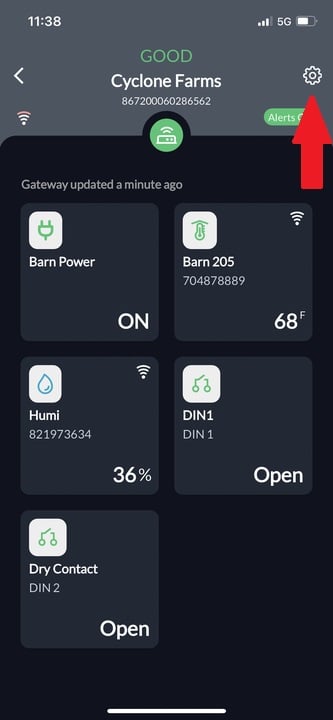
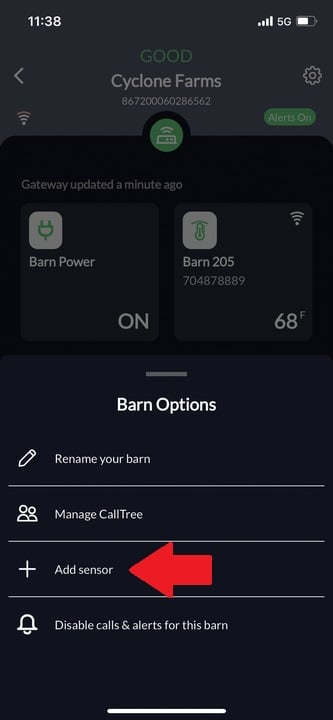
Step 4: Select Add Sensor
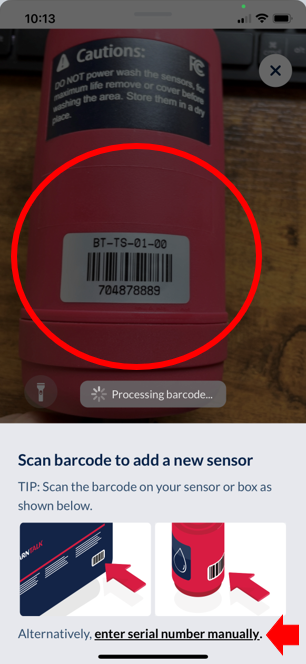
Step 5: The app will then bring up your phone's camera. Move the camera to view the sensor barcode to allow for scanning.
Note: If the barcode is unscannable or the camera does not open, the sensor serial number can be manually entered for pairing also.
Step 6: Rename and enable alarms on your newly paired sensor.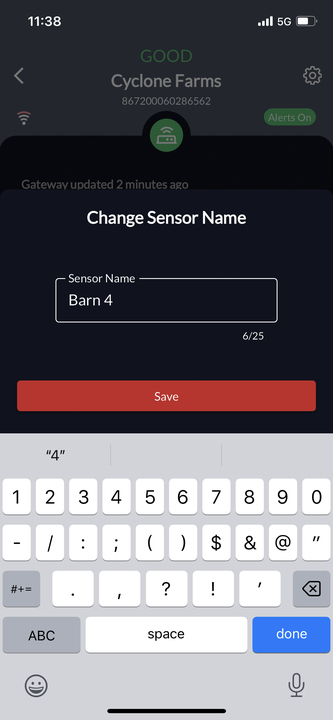
Step 7: Open the sensor and make sure the sensor is turned on
Step 8: Install BarnTalk sensor in the desired location and and wait for data to roll in!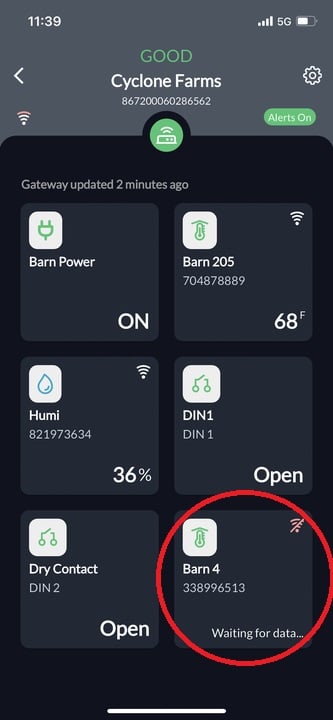
Sensor pairing is not an instantaneous action. Please allow 3-5 minutes for the sensor to fully pair and become visible in the app. BarnTalk water meters may take up to 30-60 minutes before showing a value in the app.
Scan-to-Pair works with all BarnTalk manufactured sensors.
First Time Sensor Setup: When Do Readings Begin?
Each type of sensor can take some time to show data in the BarnTalk App after it has been paired. All sensors will be visible in the BarkTalk App 3-5 minutes after pairing, but they may not necessarily show any data.
Here is how long you should expect to wait for accurate data from each sensor after pairing:
-
Gateway: It can take up to 30 minutes after the initial startup before it will show "Online" in your BarnTalk App.
- BinTalk Pro:
- It can take up to 20 minutes to show connectivity with the Gateway.
- It can take an additional 48 hours before accurate bin readings will show as firmware will automatically begin downloading after pairing.
- Water Meters:
- It can take up to 1 hour after being plumbed in-line before showing a value in the BarnTalk App.
- After 4 days, you can enable the Above/Below Average Consumption thresholds
- Wireless Dry Contact: It can take up to 20 minutes before showing data in the app.
- Temperature/Humidity Sensors: It can take up to 20 minutes to show a value in the app.
If your sensor(s) still aren't showing values after pairing and waiting the allotted times, please reach out to our customer service team!
Unpairing Sensors
Gateway owners / secondary gateway owners can remove sensors from the app. CallTree members do not have this access.
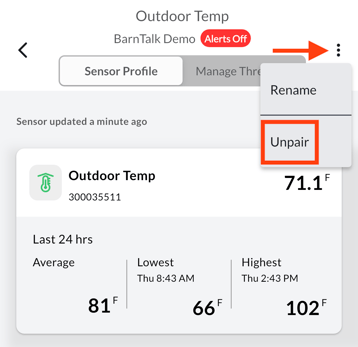
- Locate the sensor tile in the app, and tap on it.
- Select the 3 dots in the top right.
- Tap unpair.
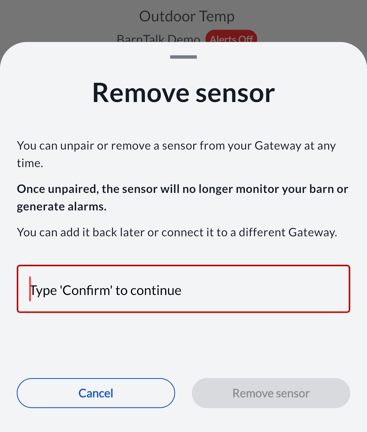
- Type 'confirm', then select remove sensor.
- Confirm is NOT case sensitive.
- All set! The sensor can now be paired to another gateway if needed.
If you have any issues or feedback, reach out to our support team via email at support@barntools.com, call/text Toll Free at 855-580-0058 during the hours of 8am-5pm CST Monday-Friday.